
Blog Checker5.0 - Download
You'll be able to download in few seconds.
Publisher Description
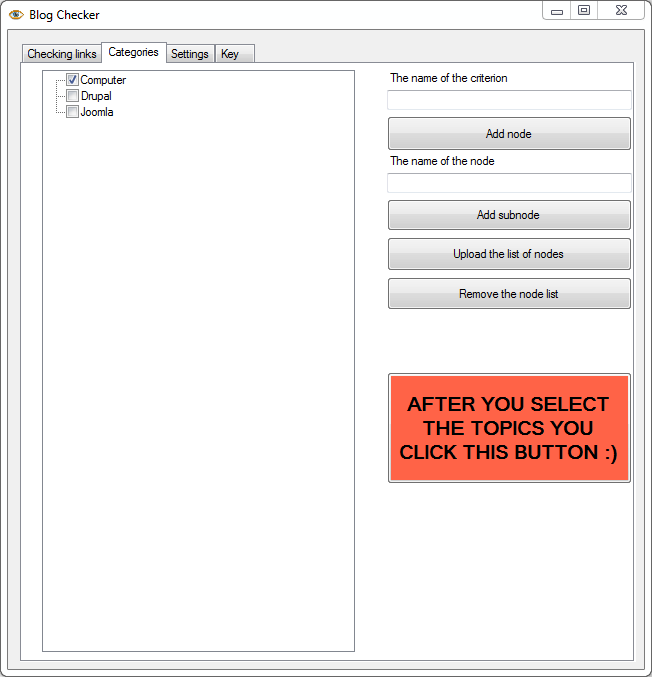
1) Run "Blog-Checker.exe" on Windows
2) In "Categories" tab click the "After you select the topics you click this button" button. If all links to be viewed belong to a single category, ignore and click. If categories and subcategories of each link are of importance, in "Categories" tab above the orange button edit them, before pressing "Start" in "Settings" tab.
3) Press "Settings" tab.
4) Press "Upload TXT file with URL" button in the upper left corner and import URLs, one URL per line (including HTTP)
5) Press "Save Log file" button, it will record the exact time, category and "Yes" or "No", depending if the link fits the manual approval process.
6) Press the "Start" button.
If you havent heard of the broken link building before, its essentially a tactic that involves letting a webmaster know about broken links on their site and suggesting an alternative resource (perhaps your own site).
It's quick to 1) parse some hundreds or even tens of thousands of links, it's possible to 2) check the outgoing links with tools like broken link search software from ScreamingFrog.co.uk, but if one wants to 3) manually check if each link is topically relevant to the content piece of your own website, one has to open and rate hundreds of URLs every day. Even clicking and copy-pasting from .xls would take a lot of time, not to say about the rest.
Using our Blog Checker Tool helps to review 100 websites in less than 1 hour. Its a huge economy of time for those who have to go through huge list of links. There are rare websites on AJAX that do not load properly (with the IE function turned off), otherwise it has been successfully tested on tens of thousands of links.
About Blog Checker
This Browser Tools program is available in English. It was last updated on 29 September, 2026. Blog Checker is compatible with the following operating systems: Windows.
The company that develops Blog Checker is FirstSiteGuide.com. The latest version released by its developer is 5.0.
The download we have available for Blog Checker has a file size of 14.7 MB. Just click the green Download button above to start the downloading process. The program is listed on our website since 2015-04-23 and was downloaded 0 times. We have already checked if the download link is safe, however for your own protection we recommend that you scan the downloaded software with your antivirus. Your antivirus may detect the Blog Checker as malware if the download link is broken.
How to install Blog Checker on your Windows device:
- Click on the Download button on our website. This will start the download from the website of the developer.
- Once the Blog Checker is downloaded click on it to start the setup process (assuming you are on a desktop computer).
- When the installation is finished you should be able to see and run the program.
Program Details
System requirements
Download information
Pricing
Version History
version 5.0
posted on 2015-04-23
Disclaimer
External Download
We do not host Blog Checker on our servers. We did not scan it for viruses, adware, spyware or other type of malware. This app is hosted by the software publisher and passed their terms and conditions to be listed there. We recommend caution when installing it.
The external download link for Blog Checker is provided to you by apps112.com without any warranties, representations or guarantees of any kind, so access it at your own risk.
If you have questions regarding this particular app contact the publisher directly. For questions about the functionalities of apps112.com contact us.
